Chapter 3 and Chapter 5
WHAT IS AN OBJECT?
Objects group together a set of variables and functions to create a model of a something you would recognize from the real world. In an object, variables and functions take on new names.
In JavaScript: • Variables have a name and you can assign them a value of a string, number, or Boolean. • Arrays have a name and a group of values. (Each item in an array is a name/value pair because it has an index number and a value.) • Named functions have a name and value that is a set of statements to run if the function is called. • Objects consist of a set of name/value pairs (but the names are referred to as keys).
PROPERTIES: KEY VALUE
name string
rooms number
booked number
gym Boolean
room Types array
CREATING· OBJECTS USING LITERAL NOTATION
This example starts by creating an object using litera l notation.
`var hotel = {
name: ‘Quay’,
rooms : 40,
booked: 25,
checkAvailability: function() {
return this.rooms - this.booked;
}
} ;
JAVASCRIPT
var elName = document .getElementByld(‘hotelName’);
elName.textContent =hotel .name;
var elRooms = document.getElementByid{‘rooms’);
elRooms .textContent = hotel .checkAvailability();`
CREATING OBJECTS USING CONSTRUCTOR SYNTAX
Ex:
`var hotel = new Object();
hotel.name= ‘Park’;
hotel.rooms = 120;
hotel .booked = 77;
hotel .checkAvailability = function()
return this . rooms - this.booked;
} ;
JAVASCRIPT
var elName = document.getElementByid(‘hotelName’);
elName.textContent = hotel . name;
var elRooms = document .getElementByid(‘rooms’);
elRooms .textContent = hotel .checkAvailability(};`
CREATE & ACCESS OBJECTS CONSTRUCTOR NOTATION
Ex:
`function Hotel (name, rooms, booked) {
this .name = name;
this.rooms = rooms;
this.booked = booked;
this.checkAvailability = function()
return this.rooms - this.booked;
} ;
var quayHotel
var parkHotel
new Hotel(‘Quay’, 40, 25);
new Hotel( ‘ Park’, 120, 77);
var details!= quayHotel .name + ‘ rooms : ‘;
detailsl += quayHotel.checkAvailability();
var elHotell = docurnent.getElementByid(‘hotell’);
elHotell.textContent =details!;
var details2 = parkHotel .name+ ‘ rooms: ‘;
detai l s2 += parkHotel.checkAvailability();
var e1Hotel2 = document.getEl ementByid(‘hotel2’);
elHotel2.textContent = details2;`
The Document Object Model (DOM) :
specifies how browsers should create a model of an HTML page and how JavaScript can access and update the contents of a web page while it is in the browser window. The DOM is neither part of HTML, nor part of JavaScript; it is a separate set of rules.
THE DOM TREE IS A MODEL OF A WEB PAGE
Asa browser loads a web page, it creates a model of that page. The model is called a DOM tree, and it is stored in the browsers’ memory. It consists of four main types of nodes.
BODY OF HTML PAGE
<html>
<body>
<di v id="page">
<hl id="header">List</hl>
<h2>Buy groceries</h2>
<ul>
<li id="one" class="hot"><em>fresh</em> figs</li>
<li id="two" class="hot">pine nuts</l i>
<l i id="three" class="hot">honey</l i>
<l i id="four">balsamic vinegar</l i>
</ ul>
<script src="js/l i st. js "></scri pt>
</ div>
</ body>
</ html>
THE DOCUMENT NODE
Above, you can see the HTML code for a shopping list, and on the right hand page is its DOM tree. Every element, attribute, and piece of text in the HTML is represented by its own DOM node. At the top of the tree a document node is added; it represents the entire page (and also corresponds to the document object, which you first met on p36).
ELEMENT NODES
HTML elements describe the structure of an HTML
page. (The <h l > - <h6> elements describe what
parts are headings; the <p> tags indicate where
paragraphs of text start and finish; and so on.)
DOM tree :
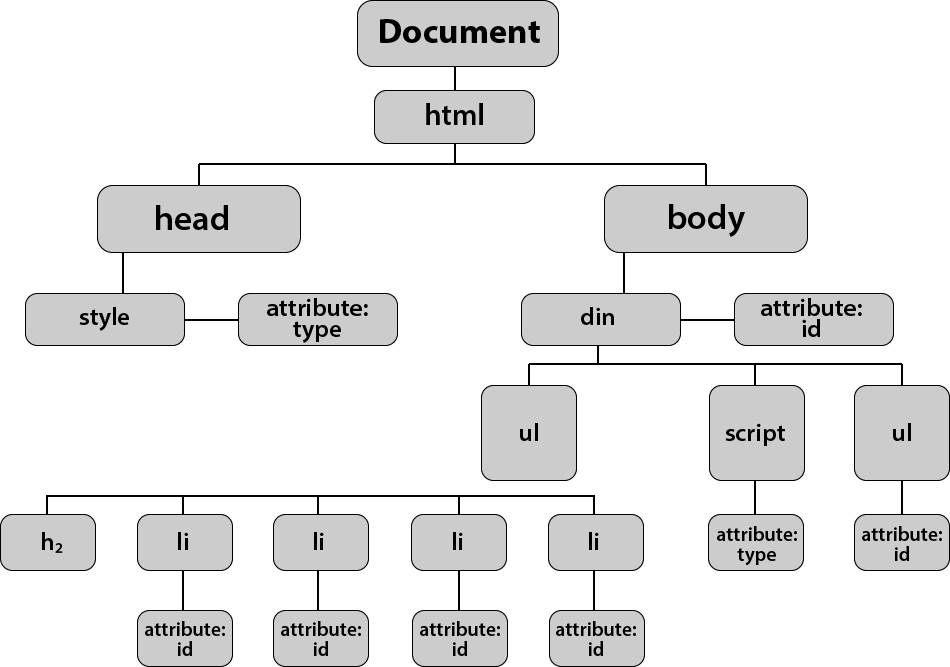
ACCESSING ELEMENTS DOM queries may return one element, or they may return a Nodelist, which is a collection of nodes.
SELECTING ELEMENTS USING CLASS ATTRIBUTES
var elements = document .getEl ementsByClassName(‘hot’); // Find hot items
if (e lements .l ength> 2) { // If 3 or more are found
var el = elements[2]; // Select the th i rd one from the Nodelist el.className = ‘cool’; // Change the value of its class attribute
LOOPING THROUGH A NODELIST
If you want to apply the same code to numerous elements, looping through a Nodelist is a powerful technique.
JAVASCRIPT It involves finding out how many items are in the Nodelist, and then setting a counter to loop through them, one-by-one. Each time the loop runs, the script checks that the counter is less than the total number of items in the Nodelist.
TRAVERSING THE DOM When you have an element node, you can select another element in relation to it using these five properties. This is known as traversing the DOM.
WHITESPACE NODES
Traversing the DOM can be difficult because some browsers add a text node whenever they come across whitespace between elements.